Context Engineering: The 5-Step Workflow That Replaces Vibe Coding
Vibe coding will bury you in tech debt within the week. Here's the structured 5-step context engineering workflow that turns AI from a loose cannon into a precision tool.
Everybody wants to build SaaS with AI. Very few are shipping something that actually works. And I'll tell you exactly why: they're skipping the boring part.
They go straight from idea to prompting. They open Cursor or Claude Code, type something like "build me a dashboard," get some code back, look at it and say "close enough." That's vibe coding. And for a quick prototype or a throwaway demo, it's fine. But if you're building a real product — something customers will pay for and depend on — vibe coding will bury you in tech debt within the week. You'll spend more time fixing broken things than building new things.
I'm Sean. I've bootstrapped SaaS products for 15 years and I'm currently building Clockless, a legal billing SaaS, entirely with AI tools. What I'm going to show you instead is context engineering — a structured approach that turns AI from a loose cannon into a precision tool. Once you adopt it, you'll never go back.
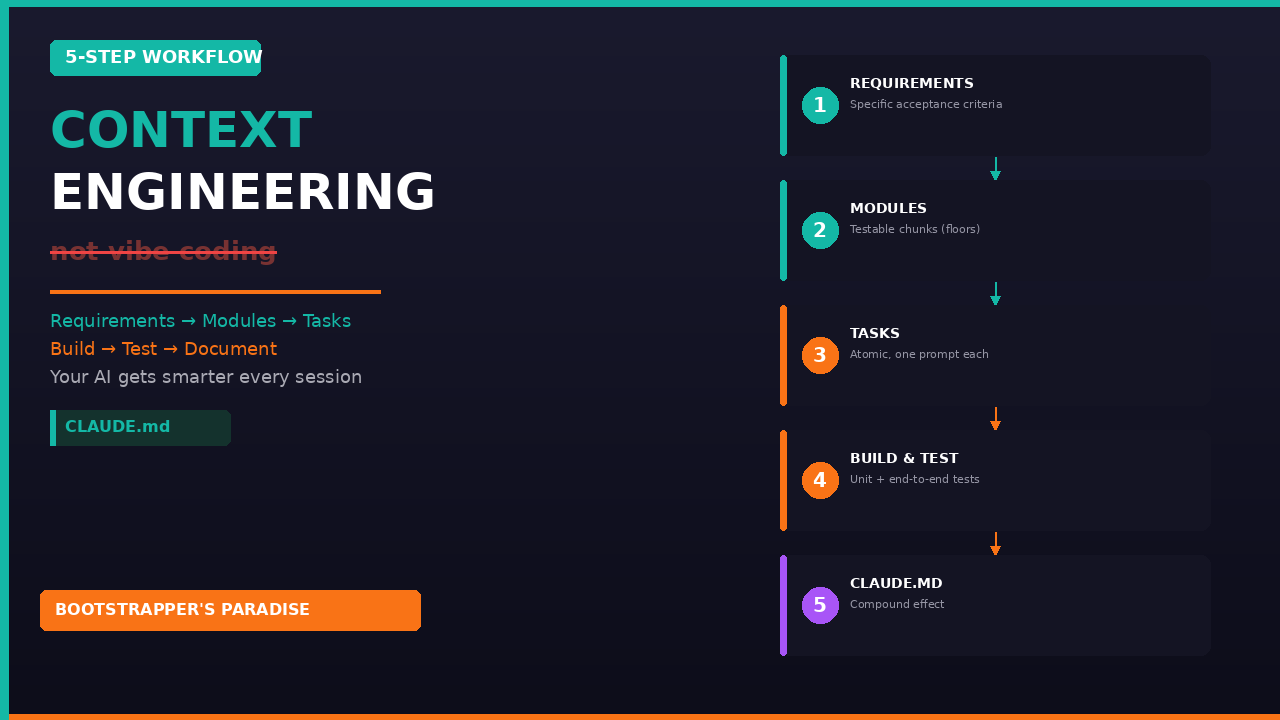
The 5-Step Workflow
Here's the full workflow. Each step builds on the last.
Step 1: Outline Your Requirements
Before you create a single prompt, write down what you're building. Not vaguely — specifically.
Vibe coding version: "Build me a dashboard."
Context engineering version: "A client management screen that displays a list of clients with name, email, and billing rate. Users can add, edit, and delete clients. Data persists to the database via API. The list supports search and filtering."
See the difference? The first version leaves AI guessing about every decision. The second tells your agent exactly what success looks like.
For Clockless, every feature starts as a short requirements document. I include what it does, who it's for, what the inputs and outputs are, and what the edge cases look like. This takes about 10 minutes but saves hours.
Step 2: Break Requirements Into Modules
A module is a logical chunk of your application that can be built and tested independently. For the client management feature, my modules might be: Module A — database schema and API endpoints; Module B — client list UI with search and filter; Module C — add/edit client forms with validation.
Why modules? Because each one gets its own test suite. When you finish Module A, you run end-to-end tests on the API. If they pass, you know your foundation is solid before building UI on top. If they fail, you know exactly where the problem is.
Think of modules like floors of a building. You don't build the third floor until the second floor can hold weight.
Step 3: Break Modules Into Tasks
A task should be small enough that AI can complete it in one prompt and you can verify it in under five minutes. For Module A (database and API), tasks might be: create the clients table schema, build the GET endpoint to list all clients, build the POST endpoint to create a client, build the PUT endpoint to update a client, build the DELETE endpoint to delete a client.
Each task has clear inputs, clear outputs, and a test that proves it works. This is where most people go wrong — they try to get AI to build the entire module in one shot. That's too much ambiguity. AI makes assumptions you don't catch, and they compound into bugs.
Keep tasks small. Clear criteria. One at a time.
Step 4: Build and Test
Give AI one task at a time. It writes the code, then you test it. Getting the testing cadence right is critical.
After each task: run a unit test. After each module is complete: run end-to-end tests. Unit tests verify the individual piece works. End-to-end tests verify the pieces work together. This two-layer approach catches bugs at the smallest possible scope.
Here's the rule I live by: If the tests pass, keep moving and don't review the code. If the tests fail, then review the code to find out what went wrong. If it's an isolated issue, fix it. If it's a pattern, update your CLAUDE.md file so the agent doesn't make that mistake again.
This sounds counterintuitive — engineers are trained to review every line. But if you have a solid test suite and everything passes, what exactly are you reviewing for? Style preferences. You're probably just wasting time. The tests are your quality gate. Trust them.
When tests do fail, nine times out of ten, the failure reveals a gap in your requirements, not a gap in AI's ability. Maybe you didn't specify an edge case. Maybe your acceptance criteria was ambiguous. Maybe you assumed AI would handle authentication a certain way and it didn't.
Step 5: Feed Lessons Back Into CLAUDE.md
This is the step that separates amateurs from professionals. Every time you discover a misdesign pattern, an edge case AI didn't handle, or a convention it didn't follow, you don't just fix it and move on — because it'll come back. You document it in your CLAUDE.md file.
If you're not familiar with CLAUDE.md, it's a project-level instructions file that Claude Code reads at the start of every session. It's your AI's persistent memory. It's the "context" in context engineering.
When I was building Clockless, I discovered AI kept generating API endpoints without proper error handling. So I added a guideline to my CLAUDE.md: "All API endpoints must include a try-catch block with specific error codes and user-friendly error messages. Never return the raw error object to the client." From that point on, every endpoint included proper error handling. I never had to fix that issue again.
This is the compound effect. Your CLAUDE.md gets richer with every task, which means your AI gets better with every session. Only a week into building Clockless, my CLAUDE.md had dozens of guidelines covering everything from database naming conventions to how authentication should work to how API responses should be structured.
The Fundamental Difference
With vibe coding, you make the same mistakes over and over because the AI has no memory. With context engineering, your agent gets smarter over time. You're not just building software — you're building an increasingly effective development partner.
The Context Engineering Guide
The full 5-step workflow, Clockless examples, and a template to replace vibe coding with structured AI development.
Your Homework
Take whatever you're building (or want to build) and write requirements for one feature. Break it into modules and tasks. Feed those tasks to your AI tool one at a time and test each one. You'll ship faster and with fewer bugs than anything you've built with vibe coding.
Start the free 5-day email course
Watch the Build in Public Series on YouTube
Tags: Context Engineering, Vibe Coding, AI Development, CLAUDE.md, Claude Code, Clockless, SaaS, Bootstrapping, Testing, Build in Public
Ready to Build Your Own SaaS?
Learn how to go from idea to launch in my free 5-day email course — no coding or big budget required.
Start the Free Course